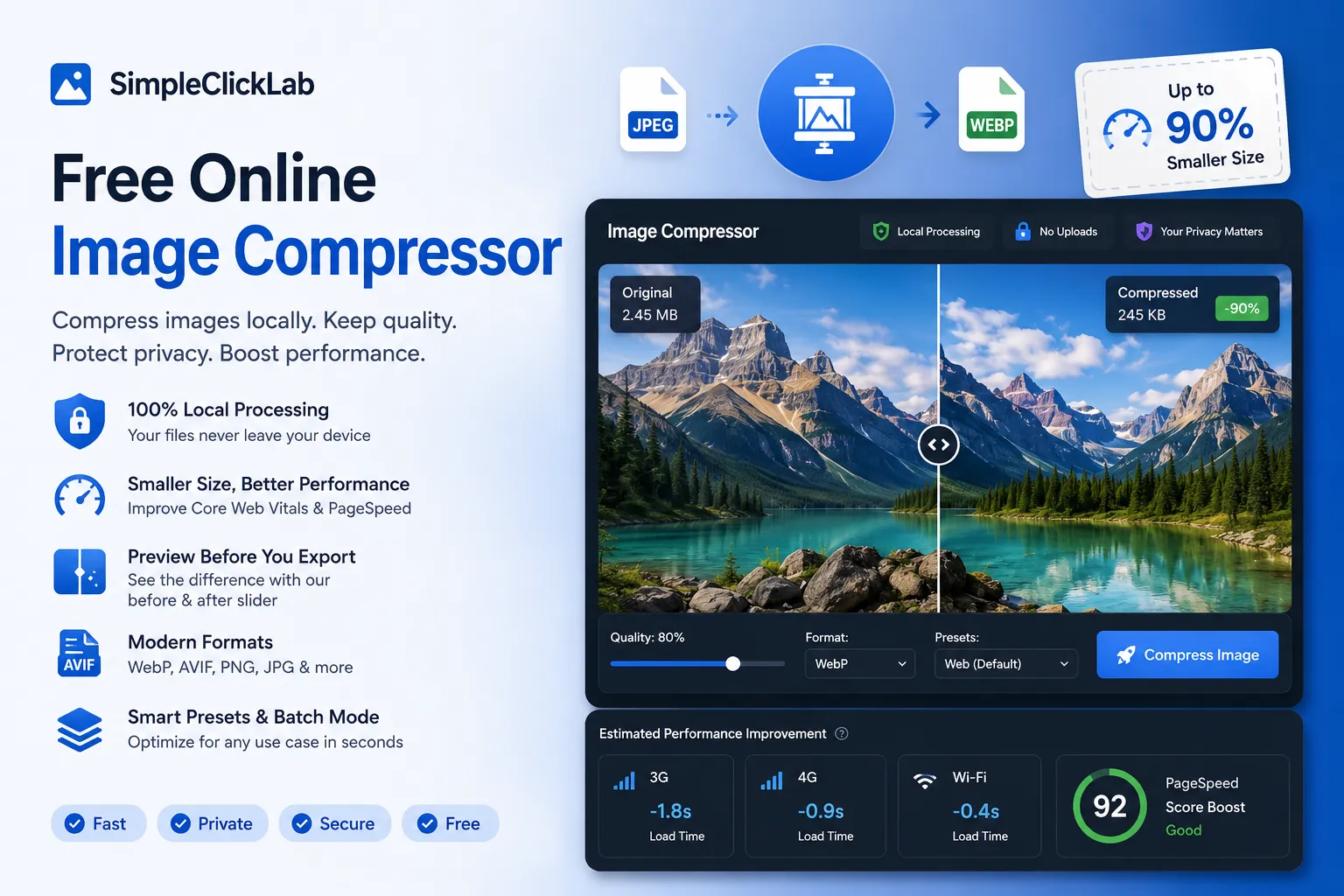
He probado casi todos los compresores del mercado: TinyPNG, FreeConvert y decenas de páginas web que olvido al instante. Reducen el tamaño del archivo, pero el proceso suele ser bastante molesto. Tienes que subir tus archivos a un servidor ajeno, adivinar los ajustes de calidad ideales, descargar el resultado, ampliar la imagen, darte cuenta de que se ve borrosa y empezar de nuevo.
El compresor gratuito en línea de SimpleClickLab soluciona todos estos problemas.
Por qué las imágenes pesadas siguen ralentizando las webs
Las imágenes son, con diferencia, los elementos que más pesan en cualquier sitio web. Muchos equipos de desarrollo solo se preocupan de optimizarlas cuando los informes de PageSpeed empiezan a marcar valores en rojo.
El verdadero problema no es la falta de conocimiento, sino que las herramientas tradicionales añaden demasiada fricción a los flujos de trabajo ordinarios:
- Subir archivos confidenciales a servidores externos que no inspiran total confianza.
- Tener que convertir formatos en una web y comprimir los archivos en otra diferente.
- Repetir una y otra vez el proceso de comprimir, descargar, verificar y volver a empezar.
Cuando manejas recursos gráficos de clientes o información confidencial, la privacidad de los datos es importante. Subir memes a la nube no tiene importancia, pero con prototipos comerciales o datos de clientes es diferente.
SimpleClickLab elimina este inconveniente por completo ya que realiza toda la compresión de forma local en tu navegador. Tus imágenes nunca viajan a ningún servidor externo.
Esta ventaja por sí sola cambia por completo el uso de la herramienta.
La compresión local en el navegador es un gran acierto
El compresor funciona del lado del cliente mediante procesos en segundo plano de JavaScript (Web Workers). Esto permite reducir el peso de las imágenes con rapidez y sin bloquear la pestaña de tu navegador.
No hay ningún servidor de por medio gestionando o almacenando tus archivos. Tampoco existen políticas de privacidad complejas ni almacenamiento de datos en la nube.
Además, cuenta con un detalle de diseño muy útil: la eliminación de los metadatos EXIF está activa por defecto.
Las fotos suelen contener coordenadas de ubicación, detalles de la cámara y la fecha de captura. La mayoría de los usuarios no sabe que esta información está ahí. Si necesitas conservarla, puedes hacerlo, pero proteger la privacidad del usuario por defecto es la decisión correcta.
La barra deslizante de previsualización ofrece un control total
Casi todos los compresores te obligan a confiar en el resultado final sin verlo antes.
Esta herramienta funciona de forma distinta.
Gracias a un deslizador interactivo de comparación, puedes inspeccionar el nivel de compresión de la imagen antes de descargarla.
Esto te evita tener que adivinar qué porcentaje de calidad seleccionar. Puedes comprobar al instante si las texturas o las transparencias de un archivo PNG siguen viéndose bien. Ya no tendrás que descargar cinco pruebas diferentes y compararlas en pestañas separadas.
Ajuste al tamaño de archivo deseado
Muchas plataformas imponen límites estrictos al tamaño de los archivos que permiten subir. Ocurre con frecuencia en portales de empleo, webs del gobierno y herramientas de correo electrónico.
El compresor de SimpleClickLab te permite fijar un límite exacto (por ejemplo, 100 KB o 50 KB). A partir de ahí, la herramienta calcula automáticamente los ajustes necesarios para cumplir el objetivo ofreciendo la mejor calidad posible.
Es una opción práctica que te ahorra tiempo cuando necesitas cumplir un requisito específico de peso.
Estimación del impacto en las Core Web Vitals de tu web
Esto diferencia a esta herramienta de cualquier otro compresor gratuito de internet.
El sistema estima cómo afectará la optimización de la imagen a los tiempos de carga en redes 3G, 4G y Wi-Fi, mostrando el ahorro de tiempo proyectado para la métrica LCP y el rendimiento general de PageSpeed.
Los compresores comunes se limitan a indicar que el archivo pesa menos. Esta opción conecta la compresión con el rendimiento real de tu página.
Es una información valiosa para desarrolladores y profesionales del SEO. Aunque no es un modelo predictivo exacto, ver el impacto potencial ayuda a tomar mejores decisiones sobre el peso ideal de los recursos.
TinyPNG sigue funcionando, pero no se actualiza
TinyPNG merece reconocimiento por popularizar la optimización de imágenes en la web. No obstante, al comparar las funcionalidades de ambos sistemas, es evidente que el mercado ha avanzado mientras que otros se han quedado estancados.
Los flujos de trabajo actuales necesitan soluciones más completas:
- Soporte moderno para formatos WebP y AVIF.
- Compresión de múltiples archivos por lotes de forma simultánea.
- Procesamiento local para garantizar la privacidad.
- Previsualización interactiva de la calidad en tiempo real.
- Indicadores del rendimiento de carga de la página.
- Ajustes flexibles para la exportación de recursos.
SimpleClickLab integra todas estas necesidades en un único sitio, facilitando las tareas de edición.
Perfiles de configuración adaptados a tareas reales
Normalmente, los perfiles de configuración predeterminados suelen ser reclamos publicitarios sin utilidad práctica.
En este compresor son muy funcionales.
Dispones de configuraciones listas para blogs, WordPress, tiendas de comercio electrónico, boletines de correo electrónico, mensajería instantánea o redes sociales.
Cada perfil ajusta los parámetros de calidad, el tamaño de las dimensiones y el formato de salida adecuados. El perfil de WordPress convierte a WebP, el de email prioriza un peso mínimo y el de comercio electrónico busca conservar la nitidez de los productos.
Se nota que estos perfiles han sido configurados por profesionales acostumbrados a optimizar páginas web en su día a día.
Para quién está pensado este compresor
Esta herramienta resulta de gran utilidad para quienes gestionan archivos gráficos de forma habitual:
- Desarrolladores que buscan optimizar los resultados de Lighthouse.
- Gestores de tiendas online con amplios catálogos de producto.
- Agencias de publicidad que trabajan con imágenes confidenciales de clientes.
- Especialistas en marketing que preparan campañas de email.
- Creadores de contenido que quieren acelerar la carga de sus blogs.
Para comprimir una única imagen al mes, cualquier servicio de internet puede valer. Pero si la optimización forma parte de tu rutina de trabajo, el procesamiento en local, la vista previa interactiva y la flexibilidad de exportación marcan la diferencia.
Puedes probar la herramienta en el siguiente enlace: