Free Online Social Media Mockup Generator: Instant High-Resolution Social Post Creations
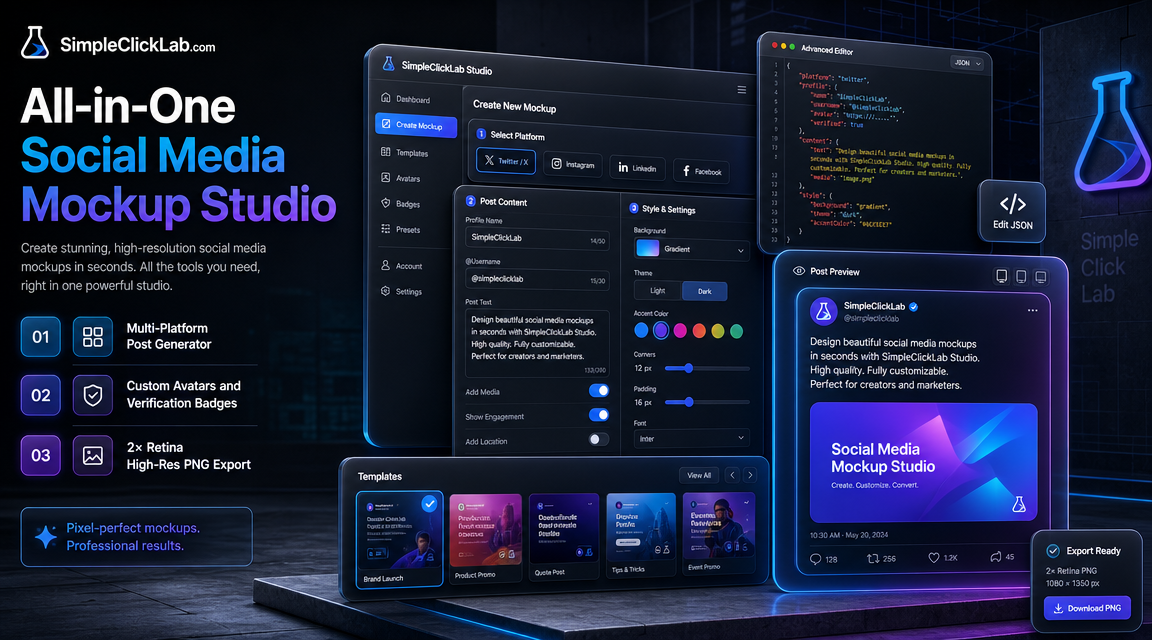
A free online social media mockup generator allows marketing managers, creators, founders, and social media VAs to produce realistic fake tweets, Instagram posts, LinkedIn updates, and chat simulators in high-resolution PNG format without design software. The All-in-One Social Media Mockup Studio offers pixel-perfect, retina-ready mockups across seven major platforms with custom avatars, multi-message threads, and gradient backgrounds—fully browser-based and watermark-free.
How the All-in-One Social Media Mockup Studio Works
Step 1: Select Your Platform
Choose from X (Twitter), Threads, Telegram, WhatsApp, iMessage, Instagram, or LinkedIn. This flexibility supports diverse marketing and content creation scenarios.
Start free online mockup generator
Step 2: Configure Content
Customize names, handles, text messages, multi-message chat threads, upload custom avatars, attach post images, and add verification badges. This level of detail ensures realistic and tailored mockups.
Start free online mockup generator
Step 3: Design Your Canvas
Select vibrant gradient backgrounds, adjust card padding, corner radius, and shadow intensity to match brand aesthetics or campaign style.
Start free online mockup generator
Step 4: Export as High-Resolution PNG
Download pixel-perfect 2× Retina images suitable for marketing decks, meme campaigns, or app store screenshots without watermark.
Start free online mockup generator
Comparison Table: Key Features of the All-in-One Social Media Mockup Studio
| Feature | Description | Benefit |
|---|---|---|
| Supported Platforms | X (Twitter), Threads, Telegram, WhatsApp, iMessage, Instagram, LinkedIn | Covers all major social media |
| Custom Avatars & Verification | Upload personalized avatars and verified badges | Enhances mockup authenticity |
| Multi-Message Chat Thread | Simulate conversations with multiple messages | Perfect for chat and message flows |
| Gradient Backgrounds | Choose from vibrant gradient social cards | Visual appeal and brand consistency |
| Export Options | Download watermark-free PNG, retina quality (2×) | Professional, high-res outputs |
| Browser-Based Accessibility | No installation; works on all modern browsers | Instant access, hassle-free |
For more innovative digital asset generation tools, explore the complete tools directory.
Technical Breakdown: Optimal Usage Tips
- Fake Tweet Maker X Twitter PNG: Use the platform selector to create fake tweets for marketing presentations or memes rapidly.
- Instagram Post Mockup Maker Retina: Ensure you toggle 2× export resolution for retina-quality PNGs perfect for retina displays and high-res media.
- LinkedIn Post Generator No Watermark: Customize professional updates and download clean, watermark-free posts to maintain brand integrity.
- iMessage WhatsApp Chat Simulator Online: Design multi-message chat threads that replicate real conversations for app demos or social campaigns.
- Telegram Chat Screenshot Generator & Threads Post Mockup Tool: These specialized formats help enhance multi-platform presence with realistic visual assets.
Why Use This Tool for 2026 Programmatic SEO & Marketing?
Using a versatile, browser-based mockup studio aligns with evolving 2026 SEO and AEO best practices by enabling:
- Structured, high-density content creation supporting semantic SEO.
- Fast generation of visually optimized social media templates to boost engagement and decrease bounce.
- Watermark-free, retina-ready exports catering to high-quality end-user experiences.
- Seamless integration into content marketing funnels via easy export and share functions.
Leverage this tool and fast-track content production workflows with no reliance on graphic design expertise.
Frequently Asked Questions
What file formats does the social media mockup generator export?
The tool exclusively exports high-resolution PNG files optimized for retina displays, ensuring pixel-perfect clarity without any watermark.
Can I simulate multi-message chat threads for WhatsApp, Telegram, or iMessage?
Yes, the tool supports multi-message chat thread design for Telegram, WhatsApp, and iMessage with editable participant names and precise message logs.
Is there a way to add custom avatars and verification badges in the mockups?
Absolutely, users can upload custom avatars and add verified badges to replicate authentic social media profiles for professional or creative uses.
Does the tool require installation or software downloads?
No installation or external software is needed; it is a fully browser-based studio accessible from any modern browser.
How do I ensure retina-quality exports when downloading images?
Select the 2× Retina export option before downloading to obtain PNG images that display crisply on high-density screens.
FAQ
•How can I create watermark-free LinkedIn post mockups for professional use?
Use the LinkedIn platform selector within the All-in-One Social Media Mockup Studio, customize all content fields including names, text, and images, then export the mockup as a high-resolution PNG without watermarks, ensuring professional-grade visuals for presentations or campaigns.
•What settings optimize the Instagram post mockup maker for retina displays?
Activate the 2× Retina export option before downloading your Instagram post mockup, and choose vibrant gradient backgrounds with proper padding and shadow adjustments to maximize clarity and detail on retina and high-density screens.
•Can the tool simulate multi-message chat conversations for WhatsApp and Telegram seamlessly?
Yes, the tool supports multi-message chat thread design for WhatsApp and Telegram, allowing full customization of participant names, message sequences, and custom avatars to generate realistic conversation screenshots instantly.
•Is it possible to include verification badges and custom avatars in fake tweet maker X exports?
The studio allows uploading custom avatars and attaching verification badges on tweets or X posts mockups, providing added authenticity and branding control within the fake tweet maker functionality.
•Do I need any design software or installations to use this browser-based social media mockup studio?
No external software or installation is required; the entire editing and exporting process occurs directly in-browser on any modern device, ensuring zero setup time and complete accessibility.