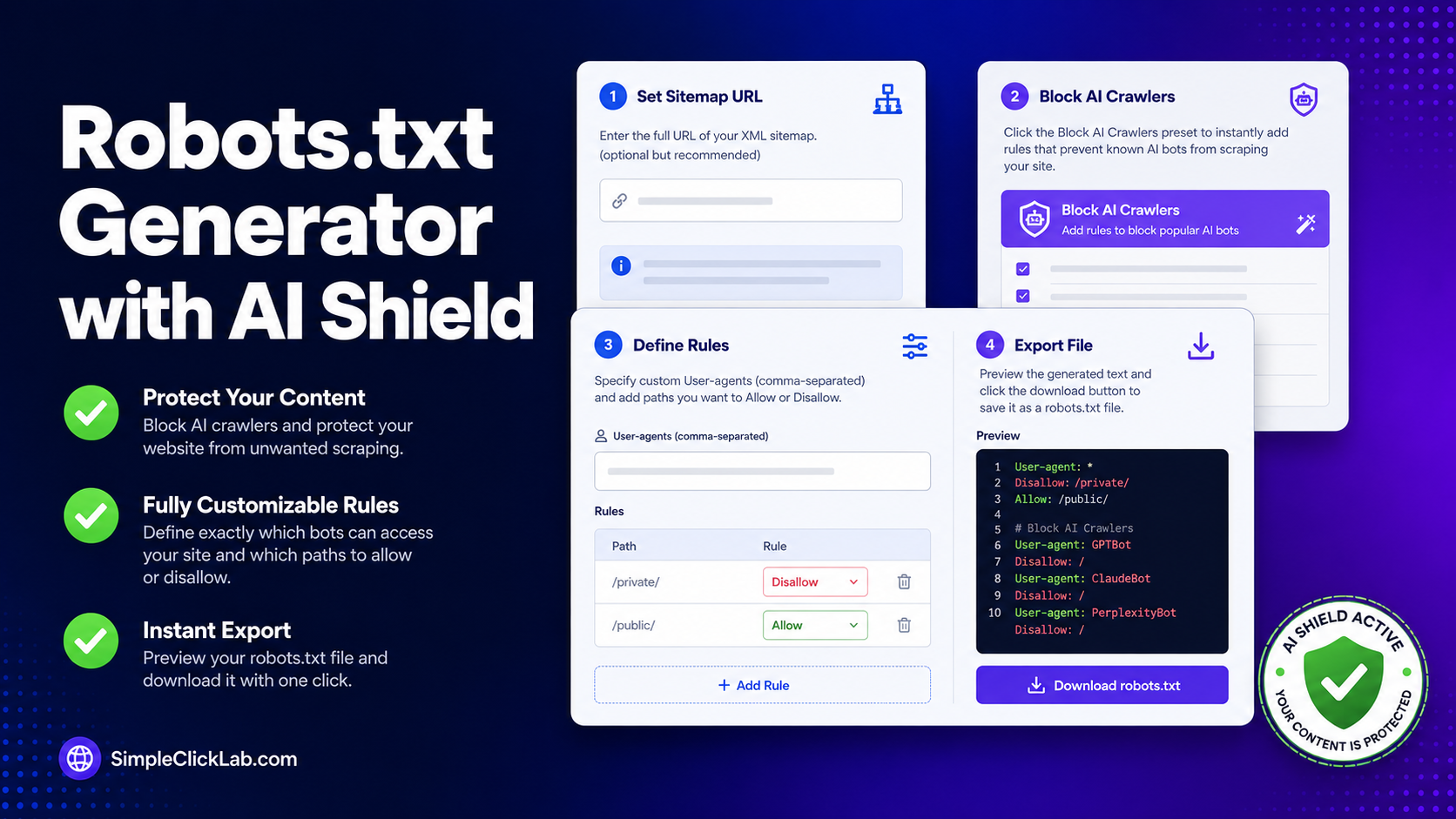
Robots.txt Generator with AI Shield
Free online tool to create robots.txt files and instantly block AI bots from scraping your content.
Initializing Module
Optimizing assets and preparing high-fidelity workspace...
What is Robots.txt Generator with AI Shield?
A `robots.txt` file (Robots Exclusion Protocol) is a text file placed in your website's root directory. It instructs search engine crawlers, web spiders, and automated bots on which folders and pages they are allowed to crawl.
Optimizing your robots file is critical for technical SEO. A clean setup helps you conserve crawl budget, keep private administrative directories out of search results, and organize search crawler sweeps.
Blocking unauthorized AI scraping is a major modern challenge. Crawlers from OpenAI, Anthropic, and Google-Extended consume your server bandwidth and train their models on your proprietary content without permission.
SimpleClickLab’s Robots.txt Generator features a built-in AI Shield. It provides a visual bot configuration dashboard to quickly declare custom Allow and Disallow directories and link your XML sitemap.
The standalone AI Shield preset instantly injects optimized rules blocking known artificial intelligence models, scrapers, and neural-net bots (like CCBot or Claude-Bot) to protect your intellectual property.
Enjoy absolute security with this 100% browser-native generator. All operations occur locally inside your browser. Your private directory structures are never sent to a server, ensuring complete confidentiality.
Key Features
- Integrated AI Shield preset: instantly blocks dozens of known LLM and AI training scrapers (GPTBot, Anthropic-ai, CCBot) in a single click
- Detailed custom rule management: easily add multiple User-Agents and corresponding Allow/Disallow path directions
- Sitemap XML path inclusion: dynamically appends your primary sitemap location to the end of the text file for search crawler discovery
- Real-time text compiler panel: watch your finalized `robots.txt` text build dynamically as you update sliders and toggles
- Frictionless file export: copy generated scripts instantly to clipboard or download directly as a validated `robots.txt` document
- 100% browser-based security: runs fully offline and keeps your system directory layouts completely secure
Common Use Cases
- Website creators configuring robots.txt rules to block search engines from crawling staging folders or admin tables
- Technical SEO professionals designing crawl-budget optimization rules for massive e-commerce architectures
- Content creators and bloggers activating the AI Shield to prevent AI scrapers from indexing copyrighted articles
- Systems administrators standardizing server crawl configurations and resolving search console resource limits
- Students and junior developers learning about search crawl standards, Web Robots protocols, and User-Agent parameters
Your data never leaves your browser
Control how search engine crawlers interact with your content by creating a custom robots.txt file. This visual generator helps you specify crawl rules, link your XML sitemap, and instantly block AI crawlers (like GPTBot, Anthropic, and Google-Extended) with a built-in AI Shield. Professional instructions help prevent indexing of private pages and unauthorized AI scraping.
How to use it
Set Sitemap URL
Enter the full URL of your XML sitemap (optional but recommended).
Block AI Crawlers
Click the 'Block AI Crawlers' preset to instantly add rules that prevent known AI bots from scraping your site.
Define Rules
Specify custom User-agents (comma-separated supported) and add paths you want to Allow or Disallow.
Export File
Preview the generated text and click the download button to save it as a 'robots.txt' file.
FAQ
?What is a robots.txt file?
A robots.txt file is a text file website owners create to tell search engine bots how to crawl pages on their website.
?Where should I upload the robots.txt file?
It should always be uploaded to the root directory of your website (e.g., example.com/robots.txt).
?How do I block AI bots from scraping my site?
Our AI Shield preset automatically adds a comprehensive list of known AI crawlers (such as GPTBot, CCBot, Google-Extended, Anthropic-ai) and sets their access to 'Disallow: /'. This tells them not to use your content for AI training.
?Does robots.txt guarantee privacy?
No, it's a request, not a command. Some crawlers may ignore it. For real privacy, use password protection or noindex meta tags.
Need a custom tool?
We're constantly adding new tools. Suggest one or report a bug.
Related Tools You Might Need
AI Readiness Scanner — Check If ChatGPT, Claude and Perplexity Can Read Your Site
Check whether GPTBot, ClaudeBot, PerplexityBot, Googlebot and 11 other AI agents can actually reach your page. Tests robots.txt rules and live server responses, then shows exactly what to fix.
Free Online Schema.org Validator
Free online tool to extract and validate Schema.org structured data (JSON-LD) from any website.
Free Online LLMs.txt Generator
Create an llms.txt file to guide AI models and LLMs in understanding your website and documentation.
Free Online Schema.org JSON-LD Generator
Free online create valid JSON-LD structured data markup for Articles, FAQs, Local Businesses, and Products to boost your SEO.
Free Online Sitemap XML Generator
Free online instantly create a valid sitemap.xml file from a list of URLs to submit to Google and Bing.
Free Online URL Slug Generator
Free online tool to turn article headlines into clean, SEO-friendly URL slugs with robust multi-language transliteration.