Instant Solution: Block Staging Sites & AI Crawlers With Robots.txt
A properly configured robots.txt for staging environments ensures search engines and AI scrapers like GPTBot or Google-Extended do not index or harvest your in-progress work. Use a universal User-agent: * with Disallow: / to block all bots, add selective exceptions like allowing /health endpoint, and deploy AI Shield presets to block advanced AI crawlers. Optionally include your sitemap URL to control crawler behavior.
Using the Robots.txt Generator with AI Shield
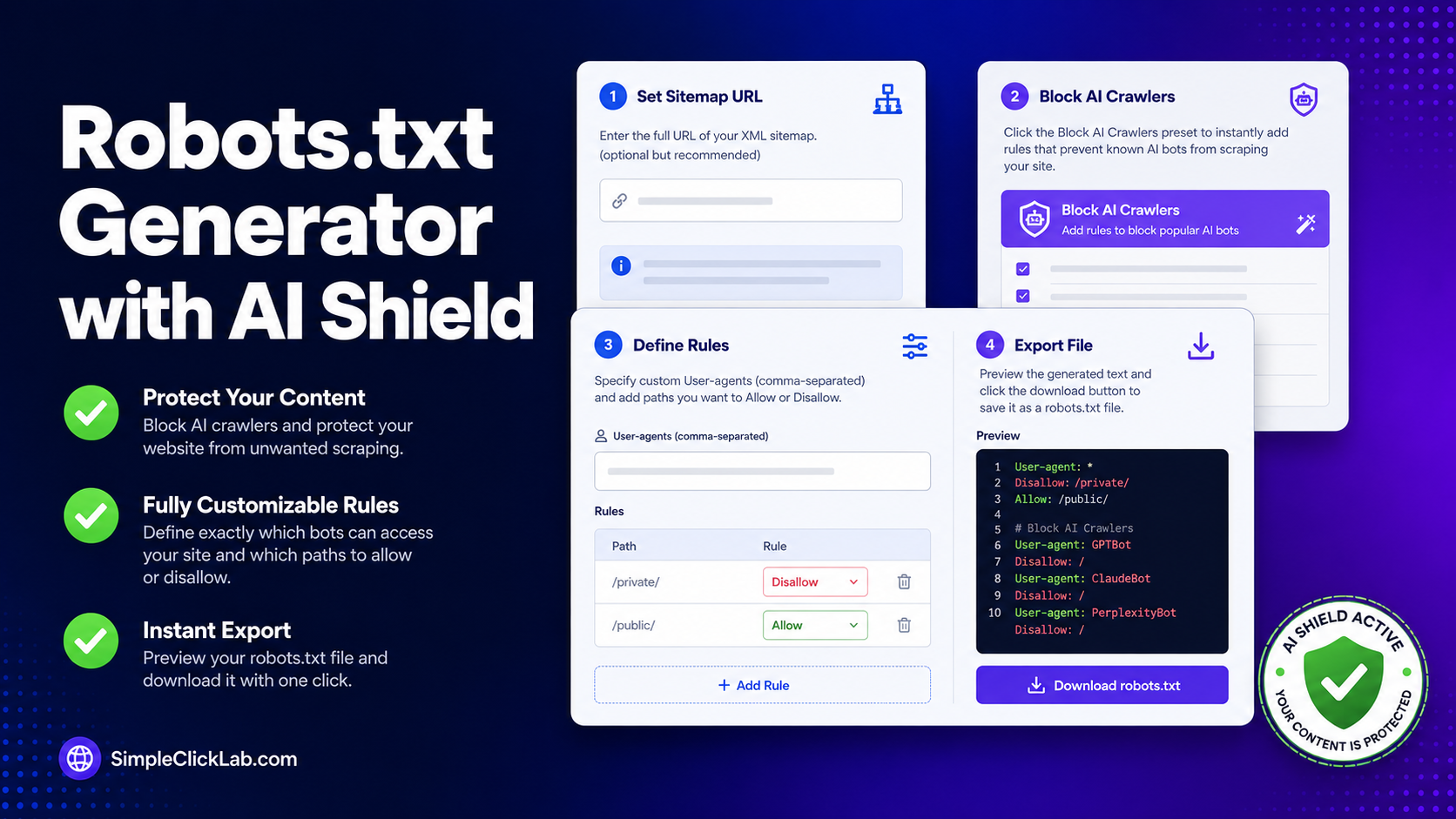
Access the Robots.txt Generator with AI Shield to create precise rules for staging subdomains, combining sitemap inclusion and AI bot blocking presets.
Step-by-Step Workflow for Staging Disallow Setup
| Step | Action | Description |
|---|---|---|
| 1 | Open the Tool | Navigate to the visual robots.txt generator |
| 2 | Select "Block AI Crawlers" Preset | Instantly insert deny rules for known AI bots: GPTBot, CCBot/Anthropic, Google-Extended, Diffbot |
| 3 | Set Universal Disallow | Add User-agent: * with Disallow: / to block all web crawlers from staging |
| 4 | Allow Selective Paths | Add exceptions like Allow: /health or Allow: /status for monitoring endpoints |
| 5 | Add Sitemap URL (Optional) | Enter full staging sitemap URL to guide allowed crawlers if any are permitted |
| 6 | Preview & Export | Review assembled robots.txt content and export the file |
| 7 | Deploy to Root | Upload robots.txt to your staging root (e.g., https://staging.example.com/robots.txt) |
| 8 | Verify Rules | Use curl requests, Google Live URL Inspection, and CDN cache purges to confirm enforcement |
Staging Subdomain Robots.txt Example
User-agent: *
Disallow: /
Allow: /health

User-agent: GPTBot
Disallow: /

User-agent: Google-Extended
Disallow: /

Sitemap: https://staging.example.com/sitemap.xml
Crawl-delay: 0
This blocks all bots globally while allowing healthcheck endpoints and embedding the sitemap URL for structured crawl guidance if needed.
Key Technical Considerations
Why Use robots.txt for Staging?
Preventing staging environment content leaks in SERPs and AI training datasets safeguards confidential code, progress, and internal testing data.
Robots.txt vs HTTP Auth
robots.txt is a crawler directive, not a security measure. To secure staging content fully, combine it with HTTP Authentication or IP whitelists.
Using Crawl-delay
Though Crawl-delay of 0 instructs no delay, many search engines treat this variably; use it primarily for rate-limiting considerations.
Wildcard Path Patterns & User-agent Rules
The tool supports wildcard patterns (*) and multiple custom User-agent entries to finely tune access control.
Exporting & Deployment
Always export the plain text robots.txt file and deploy to the root directory of the staging site for correct discovery.
Broader Developer SEO Tools
Explore additional developer-oriented SEO utilities for automation and optimization in the full tools directory. There you’ll find advanced utilities to complement your robots.txt configuration and monitor search indexing health.
Return to the visual and intuitive robots.txt Generator with AI Shield now to protect all your staging environments effortlessly with comprehensive crawler rules and AI bot shields.
FAQ
•How do I block all crawlers including AI bots on my staging site using robots.txt?
Create a `robots.txt` file with `User-agent: *` and `Disallow: /` to block all crawlers and include specific AI bot user-agents like GPTBot with `Disallow: /` rules. The AI Shield preset in the generator automates this for known AI bots.
•Can I allow healthcheck endpoints while disallowing all other staging pages?
Yes. In your `robots.txt`, add `Allow: /health` after the `Disallow: /` directive to let crawlers access healthcheck URLs while blocking all other paths.
•Is it secure to rely on robots.txt alone to prevent staging site leaks?
No. `robots.txt` only instructs well-behaved crawlers but does not enforce security. For privacy, combine with HTTP Authentication or IP allowlists to prevent unauthorized access.
•How do I add a sitemap URL to my staging robots.txt file?
Add the line `Sitemap: https://staging.example.com/sitemap.xml` at the bottom of your `robots.txt` to notify crawlers of your staging sitemap URL. This improves crawl efficiency if any bots are permitted.
•What verification steps ensure my robots.txt blocks AI bots correctly?
Test by fetching `robots.txt` via `curl` or browser, use Google Search Console live URL inspection to confirm blocking, and purge CDN caches to ensure fresh rules are served.