Instant CSS Animation Generator for Hero Section Fade-In and Slide-Up Effects
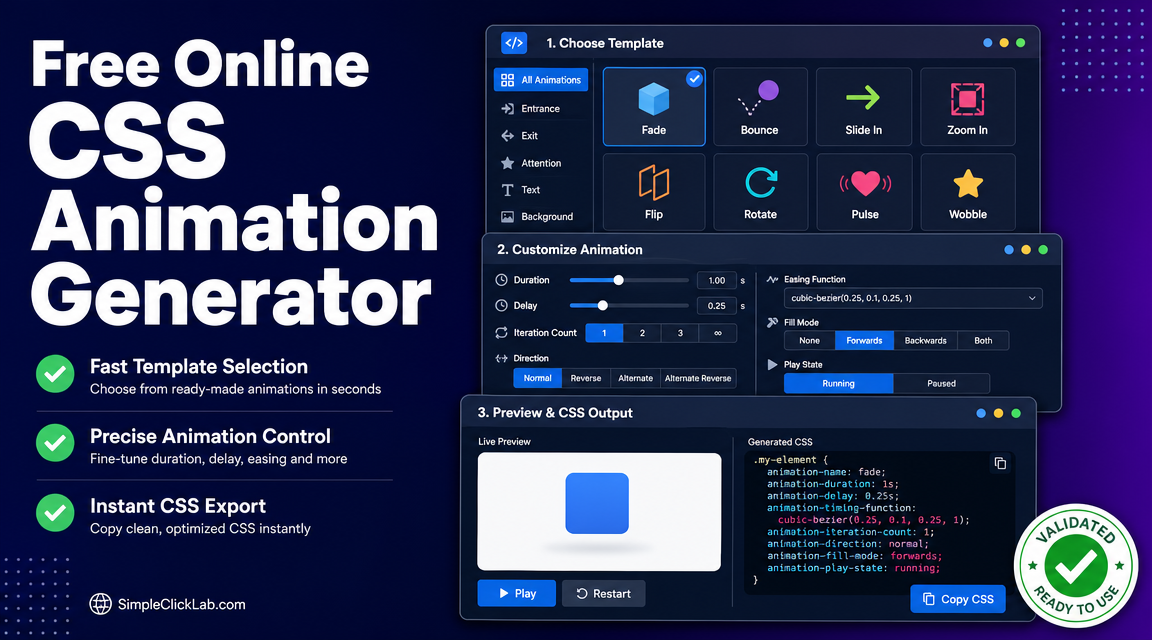
Creating performant, visually engaging hero section animations without JavaScript is essential for modern landing pages. The Free Online CSS Animation Generator produces ready-made CSS @keyframes for fade-in and slide-up effects, allowing you to implement staggered headline and CTA animations with smooth cubic-bezier easing via simple copy-paste code.
Why Choose CSS Only Animations for Landing Pages?
- Performance Friendly CSS Only: Avoid JS dependencies, enabling faster page load and reduced rendering bottlenecks.
- Responsive and Accessible: Easily incorporate
prefers-reduced-motionmedia query compliance to respect user preferences. - No-Code Builder Friendly Workflow: Ideal for visual landing page designers who seek efficient tools without manual animation scripting.
Step-by-Step Guide to Create Hero Section Fade In Slide Up CSS
| Step | Action Description | Link Reference |
|---|---|---|
| 1. Open Generator | Navigate directly to the Free Online CSS Animation Generator to start customizing your hero animation. | Open the Free Generator |
| 2. Choose Animation | Select the Fade template for opacity from 0 to 1 and the Slide template to create translateY transform slide-up effect with staggered delays for headline and CTA. | Parameters such as duration, delay, and timing function can be customized here. |
| 3. Customize Parameters | Adjust duration (e.g., 0.6s to 1.2s), set staggered animation-delay values for headline and CTA offsets, and pick smooth cubic-bezier easing to mimic microinteractions. | Each property links back to customize interface: CSS Animation Generator |
| 4. Preview & Copy | Use the live preview pane to verify animation smoothness and timing. Copy the generated cross-browser compatible CSS code with one click. | Copy code directly from Free CSS Animation Code Generator |
Key CSS Concepts for Staggered Headline and CTA Animations
- @keyframes define the sequential steps of fade (
opacity: 0 to 1) and slide (transform: translateY(20px) to translateY(0)) - animation-delay staggers the start times to create a cascading appearance effect
- animation-timing-function using smooth cubic-bezier curves ensures natural UI microinteraction flow
- Use animation-fill-mode: forwards to keep the final visible state post-animation
- Include prefers-reduced-motion media query fallback to disable or simplify animations for accessibility
Performance Best Practices and Responsiveness
- Keep animation durations between 0.3s and 1.5s for minimal user distraction
- Test animations across screen sizes to maintain responsiveness in landing page design
- Favor hardware-accelerated CSS properties (
opacityandtransform) for GPU compositing
Additional UI Utilities and Resources
Explore further UI utilities and tools for enhancing your landing pages, including loaders, gradients, and icon generators that complement animation effects and speed UI development.
Summary
The Free Online CSS Animation Generator enables landing page designers to quickly create fade-in and slide-up animations with staggered delays and smooth cubic-bezier easing, all without JavaScript. This tool delivers fully customizable, cross-browser CSS animations that enhance hero headlines and CTAs with high performance and accessibility compliance, streamlining the no-code workflow to instantly copy paste production-ready CSS keyframes.
Frequently Asked Questions
How do I create staggered headline and CTA animations using CSS only?
Use multiple elements with different animation-delay values; the generator presets fade-in and slide-up keyframes that you can customize to stagger timing precisely.
Can I customize easing to achieve smooth UI microinteractions?
Yes, the tool allows choosing or inputting custom cubic-bezier values ensuring natural acceleration and deceleration in keyframe animations.
How does the prefers-reduced-motion media query improve accessibility?
It detects if the user requests minimized motion, allowing you to disable or simplify CSS animations to reduce motion sickness or distraction.
Is the generated CSS code compatible across all major browsers?
The output includes cross-browser standard CSS syntax, supporting Chrome, Firefox, Safari, and Edge with vendor prefixes where necessary.
Can I use this tool within no-code landing page builders?
Absolutely. Generated copy-paste CSS snippets integrate seamlessly into no-code environments that allow custom CSS insertion, enhancing the design without requiring JavaScript.
FAQ
•How do I create staggered headline and CTA animations using CSS only?
Use multiple elements with different animation-delay values; the generator presets fade-in and slide-up keyframes that you can customize to stagger timing precisely.
•Can I customize easing to achieve smooth UI microinteractions?
Yes, the tool allows choosing or inputting custom cubic-bezier values ensuring natural acceleration and deceleration in keyframe animations.
•How does the prefers-reduced-motion media query improve accessibility?
It detects if the user requests minimized motion, allowing you to disable or simplify CSS animations to reduce motion sickness or distraction.
•Is the generated CSS code compatible across all major browsers?
The output includes cross-browser standard CSS syntax, supporting Chrome, Firefox, Safari, and Edge with vendor prefixes where necessary.
•Can I use this tool within no-code landing page builders?
Absolutely. Generated copy-paste CSS snippets integrate seamlessly into no-code environments that allow custom CSS insertion, enhancing the design without requiring JavaScript.