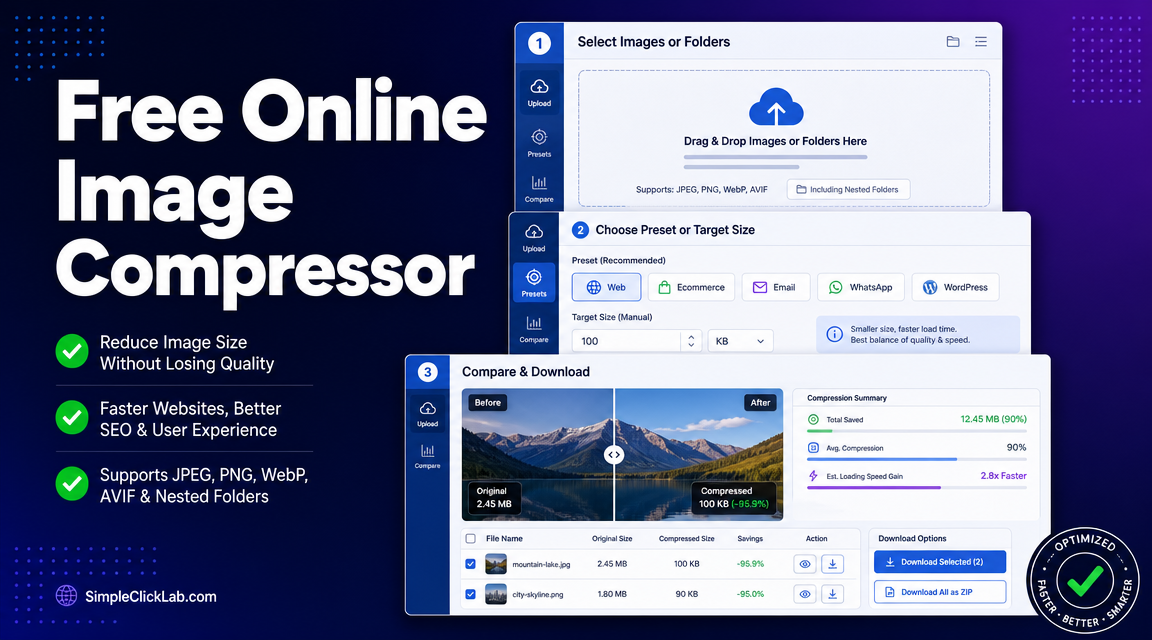
Bulk-Optimize Shopify/WooCommerce Product Images to <100 KB (WebP/AVIF) Without Losing Quality
Bulk compress product images for Shopify and WooCommerce with guaranteed preservation of PNG transparency, conversion to WebP/AVIF formats, and target file sizes under 100 KB to improve Core Web Vitals LCP scores. Use the browser-based smart compressor powered by WebAssembly codecs supporting JPEG, PNG, WebP, and AVIF format inputs.
Prerequisites
- Backup Original Files: Always keep a separate folder with your original images to revert if needed.
- Dimensions Guidance: Maintain product image dimensions consistent with your Shopify/WooCommerce theme to avoid layout shifts.
- CDN & Cache Note: Clear your site’s cache and CDN after uploading optimized images to immediately reflect improvements.
Step-by-Step Bulk Compression Workflow
| Step | Action | Details |
|---|---|---|
| 1 | Open Compressor Tool | Visit the Bulk Image Compressor page above the fold. |
| 2 | Drag Entire Folder(s) | Drag and drop your whole product-images folder(s), including nested subfolders. Supports JPEG, PNG, WebP, AVIF. |
| 3 | Select Preset | Choose Ecommerce or WordPress preset for optimized profiles tailored to online store images. |
| 4 | Enable Format Comparison | Turn on format comparison mode and select both WebP and AVIF to export multiple optimized formats. |
| 5 | Set Target Size | Switch to Target Size mode and set 100 KB to enforce file size caps suitable for fast loading. |
| 6 | Quality Inspection | Use the interactive before/after slider to verify quality preservation — especially logos, text, and transparent PNGs. |
| 7 | Download & Upload | Download batch as a ZIP file and upload images to Shopify/WooCommerce media library or your CDN server. |
| 8 | Validate Performance Gain | Rerun Google PageSpeed Insights or Web Vitals tools to confirm LCP improvements due to reduced image weight. |
Key Tips for Optimal Results
- Preserving PNG Transparency: Always use the compressor’s format comparison and enable WebP conversion keeping PNG alpha transparency intact without flattening.
- Hero Image Exceptions: For large hero images, consider loading lighter formats such as AVIF at higher quality presets or deferring with lazy loading.
- Alt Text Integrity: The image compressor does not alter alt text metadata; update alt attributes directly in Shopify/WooCommerce admin.
Troubleshooting Common Issues
- Compression Artifacts on Gradients: If lossy compression introduces color banding, try the lossless compression presets or increase quality thresholds.
- Retaining JPEG Format: For photographic product images that fail quality checks after conversion, retain JPEG with MozJPEG-based compression.
- Handling Retina/2x Images: Compress retina images separately at double dimensions to retain crispness on HiDPI displays while keeping file size low.
Explore More Tools
Expand your site speed toolkit by visiting More Free Speed Tools from SimpleClickLab, the same platform powering the product image compressor.
Bulk compressing images is critical to meet modern Core Web Vitals standards, and this targeted workflow ensures Shopify and WooCommerce developers optimize product photo assets seamlessly without quality loss or transparency issues.
FAQ
•Does AVIF format work consistently across all major browsers for product images?
AVIF is widely supported in current Chrome, Firefox, Edge, and Safari versions on desktop and mobile, but fallback to WebP or JPEG is recommended for full compatibility on older browsers.
•How can I roll back optimized images if compression quality is unsatisfactory?
Keep a backup of original images before compression, then re-upload originals to Shopify/WooCommerce or your CDN if needed to restore full-quality visuals.
•Will dragging nested folders in the compressor tool retain the directory structure upon export?
The tool accepts nested folders for upload convenience, but exported ZIP packages images flatly; reorganization should be done manually after download.
•When should I choose JPEG over WebP or AVIF for ecommerce product images?
Choose JPEG when product photos contain complex gradients or when you face artifact issues after WebP/AVIF compression; JPEG with MozJPEG provides a good quality-size balance.
•How can I verify that image compression improved my Core Web Vitals LCP score?
Rerun your product pages on Google PageSpeed Insights or Web Vitals-focused tools to observe faster Largest Contentful Paint times caused by reduced image file sizes.