Best Free Image Compressors & TinyPNG Alternatives (2026)
Free online image compressors optimize JPEG, PNG, WebP, and AVIF images directly in-browser without server uploads, ensuring data privacy and speed. The best TinyPNG alternative offers bulk folder drag-and-drop, WebAssembly codecs for fast client-side compression, WebP/AVIF conversion, and quality previews with loading speed (LCP) estimates.
Try our free image compressor for the fastest client-side bulk image optimization and modern format support including WebP and AVIF.
Quick verdict — SimpleClickLab #1
SimpleClickLab leads 2026 image compression tools with exceptional privacy since all processing occurs on your device (no uploads). It supports nested folder drag-and-drop for bulk image optimizer no upload workflows and converts PNG/JPEG to WebP or AVIF without losing transparency. Target file sizes (e.g., 100 KB) optimize ecommerce photos and WordPress WooCommerce stores for faster loading. Interactive before/after sliders highlight visual differences, and ZIP export streamlines downloads. Real-time core Web Vitals LCP improvement estimates make it the go-to for performance-conscious users.
The shortlist: Top free image compressors 2026
| Rank | Tool Name | Bulk Folder Support | Privacy (Client-side) | WebP/AVIF Conversion | Target Size Mode | Slider Preview | ZIP Export | Speed & Notes |
|---|---|---|---|---|---|---|---|---|
| 1 | SimpleClickLab | Yes | Yes | Full (WebP & AVIF) | Yes | Yes | Yes | Fastest, modern presets, LCP estimate |
| 2 | Squoosh | No | Yes | Full (WebP & AVIF) | Yes | Yes | No | Powerful but lacks bulk folder uploads |
| 3 | TinyPNG/TinyJPG | No | No (uploads server) | Partial (WebP only) | No | No | No | Popular, limited WebP support & batch size |
| 4 | iLoveIMG | Limited | No | Limited (WebP only) | No | No | No | Easy UI, less control over compression |
| 5 | Kraken.io | Limited | No | Limited | Yes | Yes | Yes | Pro-grade, but paywalled advanced options |
Comparison criteria for 2026 image compressors
- Privacy/Client-side Processing: Avoid server upload to protect sensitive images and speed up processing.
- Bulk/Folder Uploads: Drag and drop folders or nested folders to process large ecommerce product images efficiently.
- WebP/AVIF Conversion: Support for modern efficient formats like WebP and AVIF ensures best compression without quality loss.
- Target-Size Mode: Set exact output file size (e.g., 100 KB) to meet platform requirements.
- Before/After Slider: Visualize compression effects to verify quality preservation especially for ecommerce and WooCommerce stores.
- ZIP Export: Download multiple optimized images in one archive.
- Speed: Leverage WebAssembly codecs (MozJPEG, OxiPNG, libwebp, libavif) for fast client-side compression.
Who should choose which tool?
- SimpleClickLab: Best for professionals and ecommerce businesses needing bulk no-upload optimization with modern WebP/AVIF support and web performance insights.
- Squoosh: Ideal for users prioritizing advanced codec control without bulk folder uploads.
- TinyPNG/TinyJPG: Suitable for casual users requiring simple PNG/JPEG compression with some WebP support but limited batch size.
- iLoveIMG / CompressJPEG: Good for ease of use but limited features and privacy; better for quick single image jobs.
- Kraken.io: For agencies or teams requiring pro-grade features behind a paywall with extensive platform integration.
Detailed core tool functions of SimpleClickLab
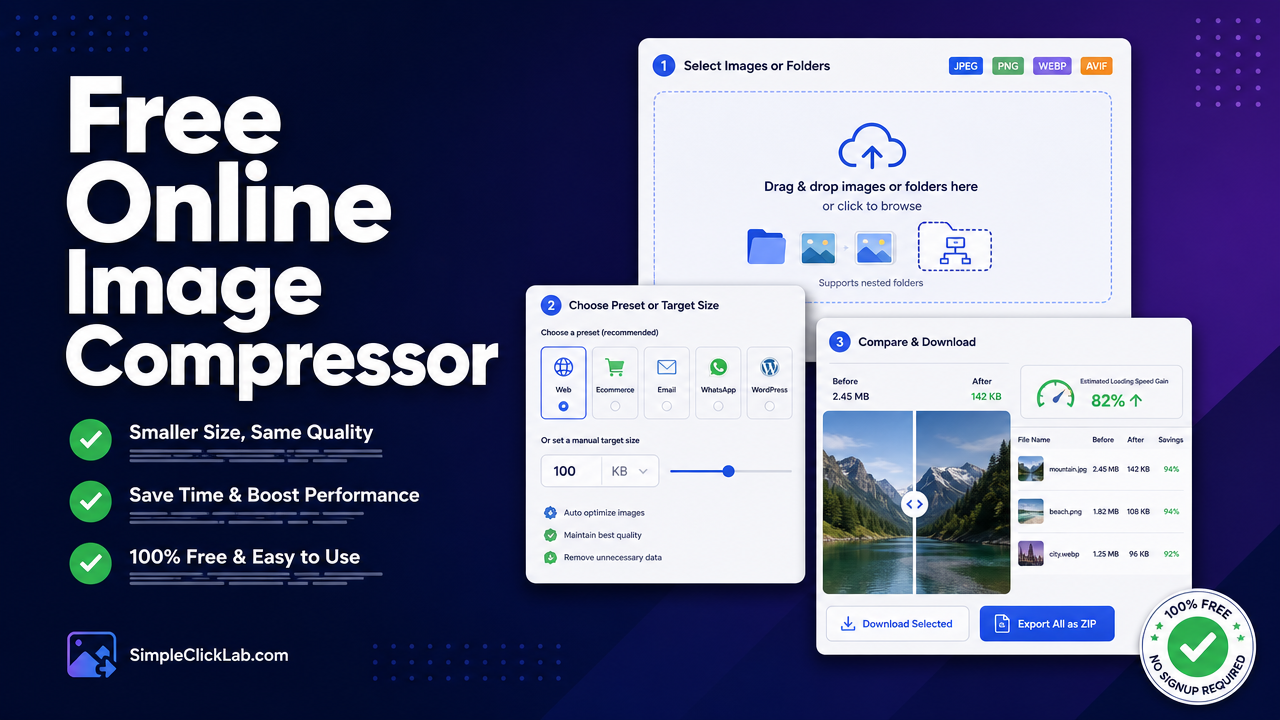
- Select Images or Folders: Drag and drop single images, multiple files, or entire nested folders supporting JPEG, PNG, WebP, and AVIF formats.
- Choose Preset or Target Size: Select use-case presets tailored for Web, Ecommerce, Email, WhatsApp, or WordPress to auto-configure compression, or manually enter target size like 100 KB.
- Compare & Download: Use an interactive before/after slider to inspect quality, compare format outputs, view estimated Core Web Vitals LCP improvements, then download images individually or export all as ZIP.
The tool uses WebAssembly codecs (MozJPEG, OxiPNG, libwebp, libavif) within the browser, ensuring no server upload, zero latency, and maximum privacy.
Frequently Asked Questions
Is client-side image compression safer than server upload?
Client-side compression retains image data locally within your browser without transmitting files to third-party servers, greatly reducing privacy risks and potential data breaches.
How to convert PNG to WebP online without losing transparency?
Select a tool that supports lossless WebP conversion with alpha channel support, like SimpleClickLab, which preserves PNG transparency through advanced WebAssembly codecs.
Do these image compressors improve Largest Contentful Paint (LCP)?
Optimized images reduce file sizes, enabling faster loading of key visual content on webpages. Tools like SimpleClickLab provide direct LCP improvement estimates, helping prioritize speed gains.
FAQ
•Is client-side image compression safer than server upload?
Client-side compression retains image data locally within your browser without transmitting files to third-party servers, greatly reducing privacy risks and potential data breaches.
•How to convert PNG to WebP online without losing transparency?
Select a tool that supports lossless WebP conversion with alpha channel support, like SimpleClickLab, which preserves PNG transparency through advanced WebAssembly codecs.
•Do these image compressors improve Largest Contentful Paint (LCP)?
Optimized images reduce file sizes, enabling faster loading of key visual content on webpages. Tools like SimpleClickLab provide direct LCP improvement estimates, helping prioritize speed gains.