What Is an llms.txt File and Why Use a Generator
An llms.txt file is a structured Markdown document compliant with llmstxt.org standards, designed to instruct AI crawlers such as GPTBot and ClaudeBot on which website pages to index. Unlike robots.txt, which primarily controls traditional search engine bots, llms.txt focuses on AI-powered Large Language Model (LLM) crawler discovery for docs and API references. The Free Online LLMs.txt Generator enables SaaS founders, developer advocates, and SEO leads to create an llms.txt file quickly and accurately by converting sitemap.xml files or manually selecting pages to expose.
How to Create an llms.txt File in 4 Easy Steps
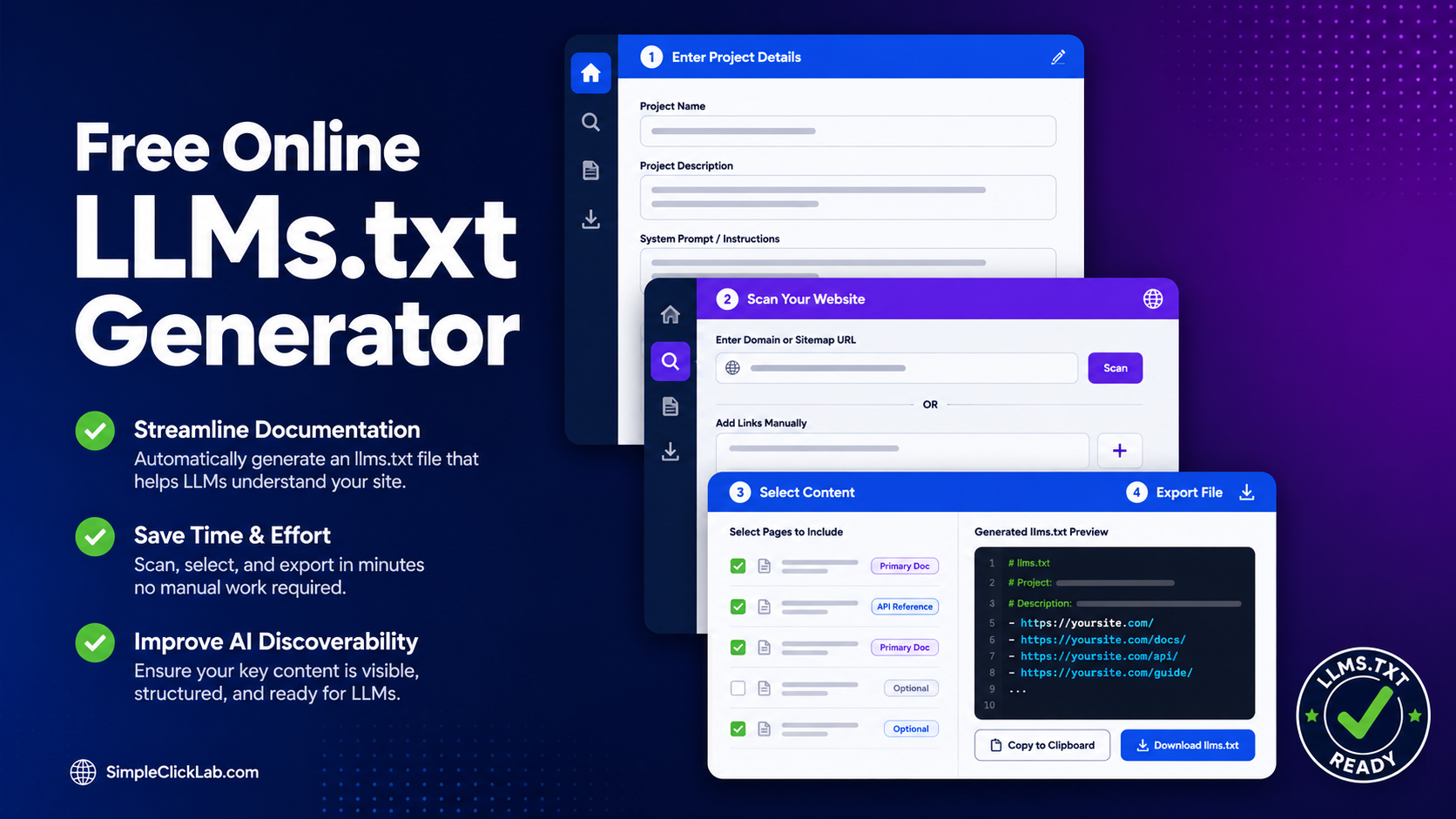
- Enter Project Details: Provide your project name, description, and system prompt to define high-level crawl instructions.
- Scan Your Website: Input your domain or sitemap.xml URL for automatic page discovery or add URLs manually.
- Select Content: Designate exposed pages as primary documentation, API references, or optional content, facilitating precise categorization.
- Export llms.txt: Copy the generated compliant Markdown code and save it as
llms.txtin your root directory.
Use this free online llms.txt maker for seamless generation and export.
Robots.txt vs llms.txt: Key Differences
| Feature | robots.txt | llms.txt |
|---|---|---|
| Purpose | Blocks or allows traditional search engine bots | Specifies pages for AI LLM crawlers (GPTBot, ClaudeBot) |
| File Format | Plain text with simple directives | Markdown structured per llmstxt.org specifications |
| Content Granularity | Basic allow/disallow rules | Page-level explicit categorization (docs, API, optional) |
| Target Crawlers | Googlebot, Bingbot, etc. | AI crawlers like GPTBot and ClaudeBot |
| Placement | Root directory of website | Root directory with filename llms.txt |
Why Convert sitemap.xml to llms.txt?
A sitemap.xml lists all public URLs but does not specify AI crawler access or category metadata. Converting sitemap.xml to an llms.txt exposes the precise documents and APIs intended for AI indexing, enabling better semantic SEO and AI-driven discovery. This process can be bulk automated through the Free Online LLMs.txt Generator’s sitemap.xml to llms.txt converter feature.
Best Practices for llms.txt Files
- Save your exported llms.txt in your website root directory to ensure detection.
- Use Markdown export for human readability and tooling compatibility.
- Categorize each URL as docs, API references, or optional content to improve crawl relevance.
- Regularly update llms.txt to reflect changes in your project documentation or API endpoints.
Launch the Free LLMs.txt Generator Now
Accelerate your AI crawler discovery setup by starting with the free online llms.txt maker. Quickly convert sitemap.xml files and customize exposure with granular content selection.
Additional SEO & AEO Utilities
Explore other tools designed to enhance your AI-enhanced SEO and AEO workflows with the comprehensive suite of utilities available on the SimpleClickLab Tools Directory.
FAQ
•How does the llms.txt file differ from robots.txt in AI crawler management?
Robots.txt blocks or allows traditional search engines using simple directives, while llms.txt uses Markdown to specify which pages AI crawlers like GPTBot and ClaudeBot should index, with page-level categorization.
•Can the Free Online LLMs.txt Generator convert a sitemap.xml directly into an llms.txt file?
Yes, the generator automatically fetches and parses sitemap.xml URLs, allowing users to bulk select pages and convert them into a fully compliant llms.txt file.
•Where should I place the exported llms.txt file on my website?
The llms.txt file must be saved in the root directory of your domain to be discoverable by AI crawlers like GPTBot and ClaudeBot.
•What content categories can I assign in an llms.txt file for better AI indexing?
You can classify URLs as primary documentation, API references, or optional details, enabling AI crawlers to prioritize and understand different content types.
•Is the generated llms.txt compatible with llmstxt.org standards and easily editable?
Yes, the tool exports llms.txt files in llmstxt.org compliant Markdown, ensuring both standard compliance and ease of manual editing if needed.