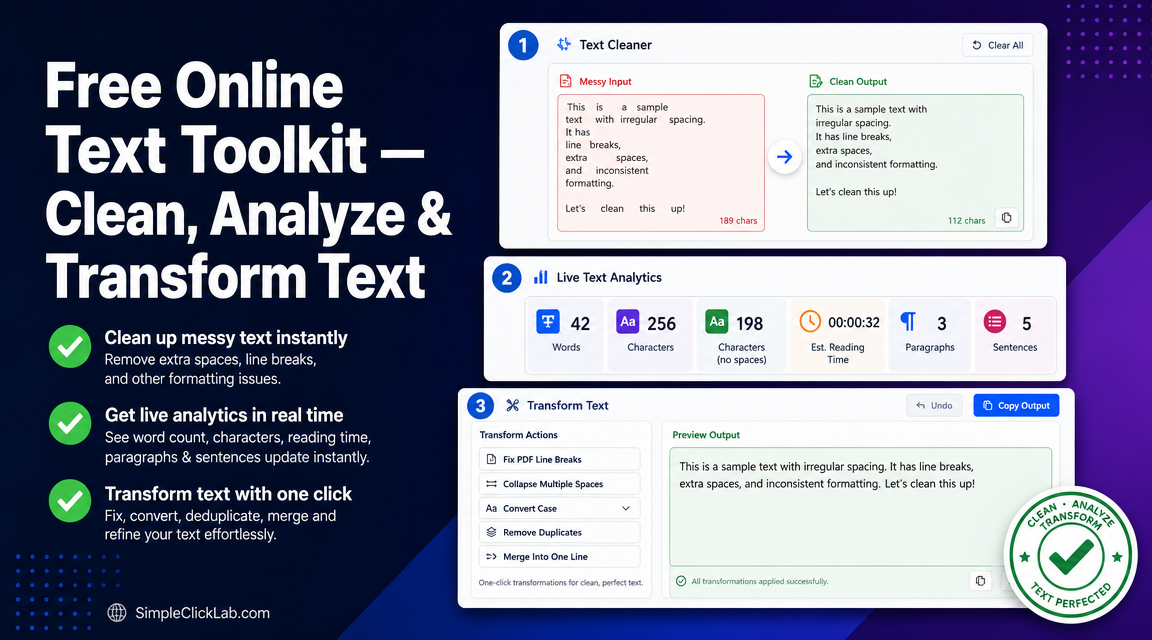
Fix Broken PDF Text for CMS in Minutes
Removing line breaks from PDF copy, cleaning pasted text for CMS, collapsing double spaces online, converting text to sentence case, and stripping formatting to plain text are critical tasks for content editors and copywriters. The Free Online Text Toolkit processes text locally without uploading files, enabling instant cleaning and formatting of messy copy-pasted PDF exports.
Step 1 Paste Messy PDF Text
Paste any copied text—whether from a PDF export, HTML snippet, or rich text source—directly into the workspace. The toolkit automatically strips rich formatting and converts your input to plain text, preparing it for further transformation.
Step 2 Click Fix PDF Line Breaks
PDF exports often break paragraphs into multiple lines, disrupting readability in CMS editors. Click the Fix PDF Line Breaks button to merge broken lines into clean paragraphs. This merges lines intelligently without creating run-ons.
Use this step to fix messy PDF to paragraph formatting seamlessly.
Step 3 Collapse Spaces and Remove Duplicates
Multiple spaces and duplicate lines clutter content and can cause styling issues in CMS. Clicking Collapse Double Spaces reduces all extra whitespace to single spaces, while Remove Duplicate Lines filters out repeated sentences or paragraphs, streamlining your text.
Improve your text with instant whitespace normalization and deduplication.
Step 4 Convert to Sentence or Title Case
Standardize your text case by selecting one of six conversion options, such as Sentence case to capitalize only the first letter of each sentence, or Title case for proper noun-style capitalization. This step ensures uniform style before publishing.
Step 5 Verify Word Count and Reading Time
The live stats bar updates instantly with word count, character count, paragraph count, sentence count, and estimated reading time. This helps optimize content length and readability for your target audience.
Step 6 Copy Clean Text to Clipboard
Once your text is flawless, copy it to your clipboard with a single click. The entire workflow supports undo operations up to 20 steps for maximum editing flexibility.
Copy your clean text now and paste it directly into your CMS.
Troubleshooting and Undo Tips
- Use the Undo button for any accidental changes.
- Refresh the browser to reset the workspace.
- Confirm your pasted text is fully visible before applying transformations.
- The toolkit processes text locally to ensure your data never leaves your browser.
Comparison of Key Text Cleaning Functions
| Function | Purpose | Benefit | Operation Type |
|---|---|---|---|
| Fix PDF Line Breaks | Merge broken text lines from PDFs | Restores paragraph structure | Merge lines |
| Collapse Double Spaces | Convert multiple spaces into a single space | Normalizes spacing | Whitespace cleanup |
| Remove Duplicate Lines | Eliminate repeated sentences or paragraphs | Removes redundancy | Deduplication |
| Convert Case (6 formats) | Change text to sentence, title case, etc. | Ensures consistent text formatting | Case transformation |
| Live Stats Bar Analysis | Real-time counts and reading time estimation | Monitor content length and readability | Text analysis |
Related Content Operations
For additional content operations—from SEO keyword density analysis to bulk URL encoding—explore the broader SimpleClickLab tools directory, designed to streamline complex content workflows with free, local-processing utilities.
Frequently Asked Questions
How can I remove unwanted line breaks from PDF text without manual editing?
Use the Fix PDF Line Breaks function in the Free Online Text Toolkit, which intelligently merges broken lines into coherent paragraphs, eliminating the need for manual copy-paste fixes.
Is it possible to clean pasted text for CMS without uploading sensitive documents?
Yes, all text processing occurs locally within your browser. The toolkit does not require uploading files, ensuring complete privacy and data security.
Can I convert pasted text to sentence case automatically?
The toolkit offers six case conversion options, including sentence case, which capitalizes only the first letter of each sentence automatically with one click.
How does the toolkit estimate reading time and word count?
As you paste or type, a live stats bar updates word and character counts, sentence and paragraph numbers, and calculates estimated reading time based on average reading speed.
Can I undo multiple steps if I make a mistake during text cleaning?
Yes, the tool supports up to 20-step undo, allowing you to revert any cleaning or transformation operations instantly without losing progress.
FAQ
•How can I remove unwanted line breaks from PDF text without manual editing?
Use the Fix PDF Line Breaks function in the Free Online Text Toolkit, which intelligently merges broken lines into coherent paragraphs, eliminating the need for manual copy-paste fixes.
•Is it possible to clean pasted text for CMS without uploading sensitive documents?
Yes, all text processing occurs locally within your browser. The toolkit does not require uploading files, ensuring complete privacy and data security.
•Can I convert pasted text to sentence case automatically?
The toolkit offers six case conversion options, including sentence case, which capitalizes only the first letter of each sentence automatically with one click.
•How does the toolkit estimate reading time and word count?
As you paste or type, a live stats bar updates word and character counts, sentence and paragraph numbers, and calculates estimated reading time based on average reading speed.
•Can I undo multiple steps if I make a mistake during text cleaning?
Yes, the tool supports up to 20-step undo, allowing you to revert any cleaning or transformation operations instantly without losing progress.