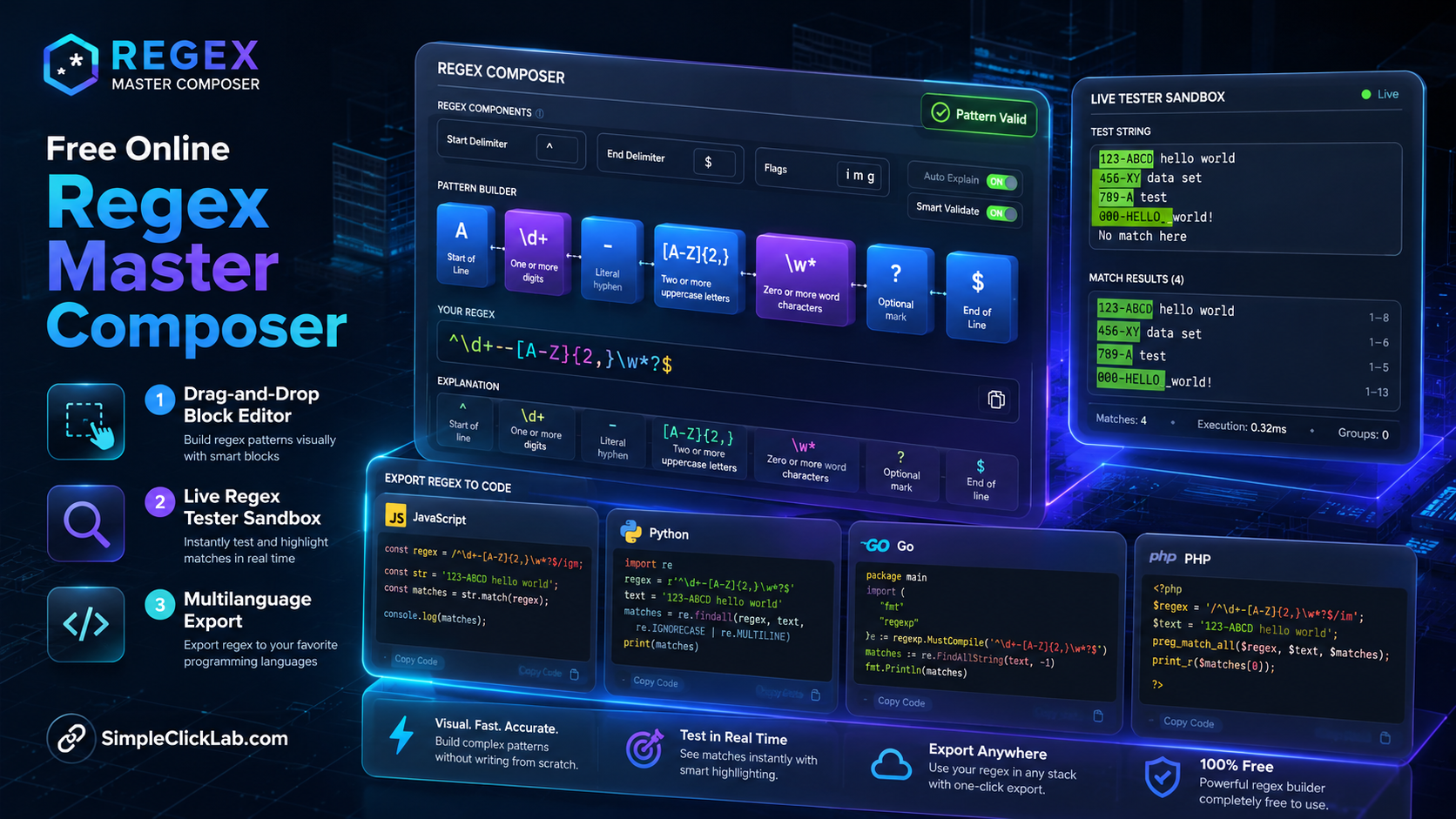
Free Online Regex Master Composer: What It Is and Who It's For
The Free Online Regex Master Composer is a block-based visual regex builder designed specifically for developers, QA engineers, and data engineers requiring an intuitive yet powerful tool to compose complex regular expressions. It provides drag-and-drop regex maker blocks, human-readable regex explanation, and real-time match highlighting to accelerate the creation and validation of PCRE compatible patterns.
This regex composer tool allows users to visually construct patterns step-by-step, easing the traditionally complex and error-prone task of regex crafting. It fits users needing a free online regex builder that supports export to major programming languages including JavaScript, Python, Go, and PHP.
Access the tool directly: Free Online Regex Master Composer
How It Works: Step-by-Step Regex Composition
1. Think in Steps
Regular expressions are sequences of discrete matching parts. The composer lets you add one block per pattern part, such as digits, letters, whitespace, or explicit text elements. Each block corresponds to a regex component like \d{3} or \w+.
2. Add and Reorder Blocks
Choose blocks by clicking their icons (Digit, Letter, Wildcard). Blocks can be reordered up or down in the sequence to shape the regex logic visually.
3. Define Frequency
Set how many times each block should repeat with a frequency dropdown offering options like exactly N times, optional, or ranges (e.g., 2-5).
4. Read the Human Translation
Under each block, the tool provides a simple English sentence translating the regex part. If this makes sense, the regex logic is likely accurate, reducing debugging.
Try it yourself with these examples:
- Email pattern: Try Email Example
- Phone number: Try Phone Example
- URL slug: Try Slug Example
Live Testing and Match Highlighting
Paste any sample or bulk text into the interactive live regex tester sandbox. Matches are instantly highlighted so you can verify correctness real-time. This immediate feedback loop ensures confidence before export or deployment.
Export Regex Patterns to JavaScript, Python, Go, and PHP
Once composition and testing are complete, export the finalized regex ready for your target language environment. The composer auto-generates code snippets compatible with JavaScript, Python, Go, and PHP, adhering to PCRE standards and language-specific syntax requirements.
| Export Language | Compatibility Notes | Usage Context |
|---|---|---|
| JavaScript | ECMA-compatible regex syntax | Frontend validation, Node.js |
| Python | Raw string compatible | Backend scripting, data parsing |
| Go | RE2 syntax tuned | High-performance server apps |
| PHP | PCRE compatible | Web form validation, scripts |
Open the builder and export easily: Free Online Regex Master Composer
Power Tips for Advanced Users
- Presets: Utilize preset blocks for common patterns (emails, phone numbers, date formats) to save time.
- Optional Groups: Create optional sub-patterns to handle flexible input.
- Quantifier Ranges: Use custom repetition ranges (e.g., 2 to 5 times) to precisely capture text variations.
- Capture Groups: Enable capture groups on any block to extract matched segments programmatically.
These features empower rapid, precise regex building without memorizing complex pattern syntax.
Frequently Asked Questions
How does the visual block editor improve regex debugging?
The block editor breaks down the regex into discrete components with human-readable explanations below each block, simplifying logical verification and enabling reordering to fix errors easily.
What is the scope of live testing capabilities?
The live regex tester sandbox allows bulk testing with immediate highlight feedback on pasted text, supporting various input lengths and complex pattern validations inline.
Can I customize the output for different programming languages?
Yes, the tool generates language-specific regex code snippets tailored for JavaScript, Python, Go, and PHP, ensuring syntactical correctness and ease of integration.
How are frequency quantifiers handled in the tool?
Frequency dropdowns define exact counts, optional appearances, or numeric ranges for each block, which translate into regex quantifiers like {n}, ?, or {n,m}.
Is the tool suitable for PCRE and ECMA regex dialects?
Yes, the composer supports PCRE compatible regex patterns and produces outputs adapted for ECMAScript and other language dialects as appropriate.
Explore more free online dev tools and utilities at SimpleClickLab Tools.
FAQ
•How does the visual regex builder handle complex quantifiers and capture groups?
The tool provides frequency dropdowns attached to each block allowing exact repetition counts, optional settings, or numeric range definitions; capture groups can be enabled per block to extract matched substrings seamlessly.
•Can I test my regex against large sample data sets in the live sandbox?
Yes, the live regex tester sandbox supports bulk input allowing you to paste extensive sample texts with instant match highlighting to validate your regex pattern effectively.
•What programming languages can I export my regex patterns to, and how accurate is the syntax translation?
You can export patterns to JavaScript, Python, Go, and PHP with syntax generated to be directly usable in those environments, ensuring PCRE compatibility and respecting each language's regex dialect nuances.
•Is this regex composer compatible with PCRE and JavaScript ES standards?
Yes, the tool builds PCRE compatible patterns and adjusts exported syntax to be fully compliant with ECMAScript regex features for JavaScript and the respective syntax formats for other target languages.